Customer agent

Customer agent

Resolves your most complex support tickets end-to-end, 24/7.

Resolves your most complex support tickets end-to-end, 24/7.

Zendesk

Intercom

Front

Plain

Viewing

Billing group

How it resolves complex support tickets

Triggers

Connects to your customer channels to help customers where they are when they need it.

Connects to your docs, help center, internal knowledge, and other knowledge sources.

Connects to your docs, help center, internal knowledge, and other knowledge sources.

When mentioned

When new message is received

When API endpoint is called

Memory (managed by AI)

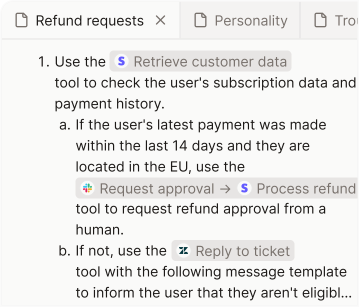
Follows natural language instructions to resolve your support tickets effectively.

Knowledge

Connects to your docs, help center, internal wikis, and other knowledge sources.

Tools

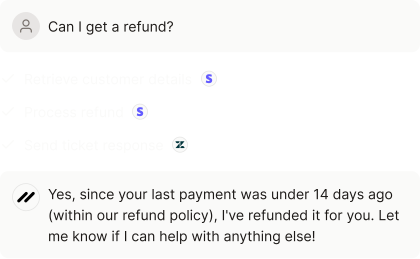
Connects to Stripe, Slack, Linear, and other tools to retrieve data and execute actions.

Connects to Stripe, Slack, Linear, and other tools to perform actions.

Stay in control

Intelligent escalations

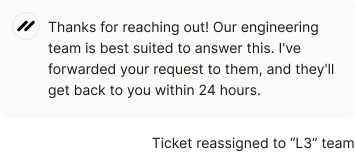
When the agent lacks the context to resolve a ticket confidently, it hands off to your team.

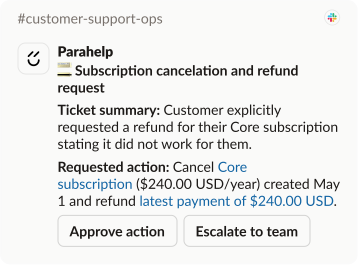
Human approvals

Enforce manual approval on sensitive actions. The agent post its recommendation in Slack.

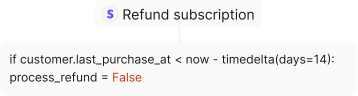
Deterministic checks

Enforce hard-coded guardrails that need to pass before an action can be executed.

Work on your customer agent locally

Clone your Parahelp customer agent repo and edit instructions or tools locally in your IDE using your go-to coding agent.

Enforce hard-coded guardrails that need to pass before an action can be executed.

Clone repo

AI builds your customer agent in hours

Hour 1: AI builds your customer agent

Connect your knowledge sources and tools, and AI builds your customer agent.

Hour 2: Review its configurations

Review and refine your customer agent’s configurations by chatting with AI.

Hour 3: Activate it

Activate your customer agent across your channels.

Hour 1: AI builds your customer agent

Connect your knowledge sources and tools, and AI builds your customer agent.

Hour 2: Review its configurations

Review and refine your customer agent’s configurations by chatting with AI.

Hour 3: Activate it

Activate your customer agent across your channels.

AI continuously improves your customer agent

Reactive

Proactive

Reactive

Proactive

Battle-tested use cases

Account deletion requests

Customer agent

Account deletion requests

Customer agent

Slack: Request action approval

Retool: Update user data

API or MCP

Account update requests

Customer agent

Account update requests

Customer agent

Retool: Update user data

API or MCP

Configuration issues

Customer agent

Configuration issues

Customer agent

Parahelp: Search knowledge

Retool: Read user data

API or MCP

Status page: Look up service status

Errors

Customer agent

Errors

Customer agent

Parahelp: Search knowledge

API or MCP: Retrieve error logs

FAQs

Customer agent

FAQs

Customer agent

Parahelp: Search knowledge

Feature questions

Customer agent

Feature questions

Customer agent

Parahelp: Search knowledge

Feature requests

Customer agent

Feature requests

Customer agent

Parahelp: Search knowledge

Linear: Search in existing Linear issues

Popular

Handling bug reports using Linear

Customer agent

,

Internal agent

Popular

Handling bug reports using Linear

Customer agent

,

Internal agent

Parahelp: Research support tickets

Linear: Search in existing Linear issues

Popular

Handling feature requests

Customer agent

,

Internal agent

Popular

Handling feature requests

Customer agent

,

Internal agent

Parahelp: Research support tickets

Integration issues

Customer agent

Integration issues

Customer agent

Parahelp: Search knowledge

Retool: Read user data

Status page: Look up service status

Integration questions

Customer agent

Integration questions

Customer agent

Parahelp: Search knowledge

Invoice link requests

Customer agent

Invoice link requests

Customer agent

Stripe: Process refund

API or MCP

Invoice questions

Customer agent

Invoice questions

Customer agent

Parahelp: Search knowledge

Stripe: Retrieve customer data

API or MCP

Known issues

Customer agent

Known issues

Customer agent

Parahelp: Search knowledge

Linear: Search in existing Linear issues

Status page: Look up service status

Password reset requests

Customer agent

Password reset requests

Customer agent

Retool: Update user data

API or MCP

Payment failures

Customer agent

Payment failures

Customer agent

Parahelp: Search knowledge

Stripe: Retrieve customer data

API or MCP

Pricing questions

Customer agent

Pricing questions

Customer agent

Parahelp: Search knowledge

Refund requests

Customer agent

Refund requests

Customer agent

Parahelp: Search knowledge

Stripe: Process refund

Slack: Request action approval

Security questions

Customer agent

Security questions

Customer agent

Parahelp: Search knowledge

Setup questions

Customer agent

Setup questions

Customer agent

Parahelp: Search knowledge

SSO/Login issues

Customer agent

SSO/Login issues

Customer agent

Parahelp: Search knowledge

Retool: Read user data

API or MCP

Status page: Look up service status

Subscription cancellation requests

Customer agent

Subscription cancellation requests

Customer agent

Stripe: Retrieve customer data

API or MCP

Technical questions

Customer agent

Technical questions

Customer agent

Parahelp: Search knowledge

Use case questions

Customer agent

Use case questions

Customer agent

Parahelp: Search knowledge

Set it up once. It improves forever.

Used by leading tech companies